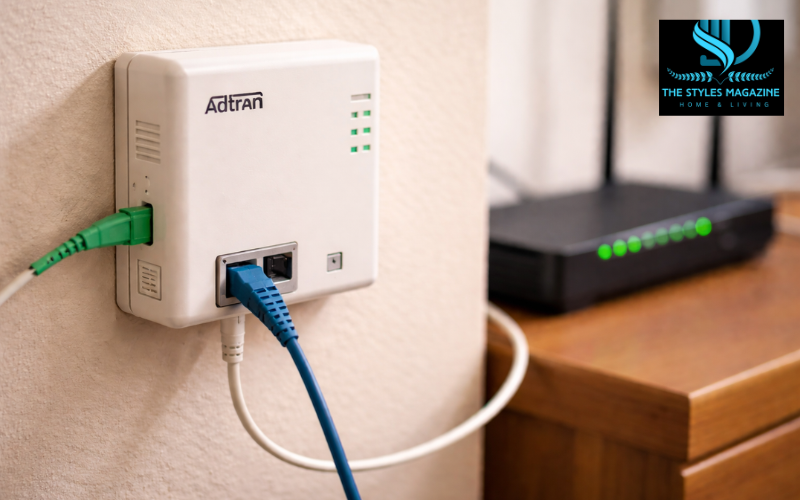
If you have ever looked at the small box mounted on your wall with cables coming in and out, you may have wondered what it actually does. Many people search what is the adtran box plugged into the wall because it looks important, yet it is not something most homeowners fully understand.
In simple terms, the Adtran box is a device that helps bring high-speed fiber internet into your home. It is commonly installed by internet providers like Spectrum, AT&T, Frontier, or CenturyLink when you sign up for fiber service. Because it is mounted on the wall and connected to cables, people often confuse it with a router or modem.
You might even see questions like what is the adtran box plugged into the wall spectrum when users notice it after installation. The confusion is natural because this device sits quietly in the background, doing a very important job without much attention.
The purpose of this box is straightforward. It acts as a bridge between your internet provider’s network and your home. It takes the signal coming from outside and prepares it so your router can deliver internet to your devices. While it may look simple, it plays a key role in keeping your connection fast and stable.
Easy Understanding
| Device | Main Job | Works With | Provides Wi-Fi |
| Adtran Box (ONT) | Converts fiber signals to internet | Fiber internet | No |
| Modem | Converts cable/DSL signals | Cable/DSL | No |
| Router | Distributes internet to devices | All types | Yes |
Understanding the Adtran Box in Simple Terms
The Adtran box is officially known as an ONT, which stands for Optical Network Terminal. While that name may sound technical, the idea behind it is quite easy to understand.
This device is installed inside your home by your internet provider. It is usually placed near where the fiber cable enters your house. Its job is to receive the internet signal from your provider and make it usable for your home network.
Many people compare it to a modem, and that comparison helps a lot. A traditional modem works with cable or DSL internet, while an ONT works with fiber internet. Both devices act as a starting point for your internet connection, but they handle different types of signals.
The key difference is that a modem works with electrical signals coming through copper wires, while the Adtran ONT works with light signals traveling through fiber cables. That is why you cannot replace it with a regular modem.
How the Adtran Box Works With Fiber Internet
Fiber internet works differently from older types of connections. Instead of using electrical signals, it uses light to carry data at very high speeds. This is where the Adtran box becomes essential.
The fiber cable outside your home carries data as pulses of light. When that light reaches your house, it cannot be used directly by your devices. The Adtran ONT converts that light into electrical signals that your router can understand.
Once the signal is converted, it is sent through an Ethernet cable to your router. From there, your router distributes internet access to your phone, laptop, TV, and other devices.
Without this conversion step, your home network would not be able to function. That is why the Adtran box is such an important part of any fiber internet setup. It quietly handles the most critical step in the entire process.
Why the Adtran Box Is Mounted on the Wall
One of the first things people notice is that the Adtran box is usually fixed to the wall. This is not random. There are a few practical reasons behind this setup.
First, the fiber cable enters your home at a specific point, often through a wall. Placing the ONT nearby keeps the connection clean and direct. This reduces the chances of signal loss or damage.
Second, mounting the box on the wall keeps it safe and stable. Fiber cables are delicate compared to regular cables, so they should not be moved around often. Keeping everything fixed helps protect the connection.
It also helps keep your home organized. Instead of having loose cables and devices on the floor, the setup stays neat and out of the way.
For these reasons, it is best not to move or tamper with the Adtran box. It is designed to stay in place as part of a stable installation.
The Role It Plays in Your Home Network Setup
The Adtran box is the starting point of your home internet system. It connects your internet provider’s network to your personal devices, but it does not work alone.
After converting the signal, the ONT sends it to your Wi-Fi router using an Ethernet cable. The router then creates a wireless network that your devices can connect to.
This is where many people get confused. The Adtran box itself does not provide Wi-Fi. It only prepares the internet signal. The router is the device that actually gives you wireless internet.
So, in a typical setup, the ONT handles the connection from outside, and the router handles the connection inside your home. Both devices are important, but they have different roles.
Common Features You May Notice on the Adtran Box
If you take a closer look at the Adtran box, you will notice a few ports and lights. These features help the device function and show its status.
Most units include an Ethernet port, which connects to your router. Some models also include a phone jack, allowing you to use a landline service over fiber internet.
There are also small indicator lights on the front. These lights show whether the device is powered on, connected to the network, and working properly. If something goes wrong, these lights can help identify the issue.
The device also requires power to operate. It is usually plugged into a nearby electrical outlet. If the power goes out, your internet connection will stop as well.
Adtran Box vs Modem vs Router – Key Differences Explained
Understanding the difference between these devices can make things much clearer.
The Adtran box, or ONT, is used only with fiber internet. It receives the signal from your provider and converts it into a usable form. Without it, your connection would not work.
A modem, on the other hand, is used with cable or DSL internet. It performs a similar role but works with different types of signals.
A router is completely different. It takes the internet connection and shares it with your devices, either through Wi-Fi or wired connections.
In a real-life setup, the ONT connects to the router, and the router connects to your devices. Each device has its own job, and they work together to deliver internet throughout your home.
Providers That Commonly Use Adtran ONT Devices
Adtran ONT devices are widely used by many internet providers, especially those offering fiber services. Companies like AT&T, Frontier, and CenturyLink often install these devices as part of their setup.
Some users also search what is the adtran box plugged into the wall spectrum because they notice similar equipment with Spectrum’s fiber offerings in certain areas.
While the brand may vary, the function remains the same. All these providers use ONTs to convert fiber signals into usable internet for homes. Adtran is simply one of the companies that manufacture these devices.
What People Say About the Adtran Box (Insights from Reddit Discussions)
If you look online, especially on forums like Reddit, you will find many discussions about this device. People often ask what is the adtran box plugged into the wall reddit because they are unsure about its purpose.
One common question is whether the box provides Wi-Fi. Many users assume it does, but quickly realize they still need a router.
Another concern is whether it can be moved or unplugged. Most experienced users advise against touching it, especially the fiber cable, because it can cause connection issues.
Some users also ask if they can replace it with their own device. The answer is usually no, since the ONT is managed by the internet provider.
These discussions show that while the device is common, it is still not widely understood by everyday users.
Important Things You Should Not Do With the Adtran Box
Even though the Adtran box looks simple, it should be handled with care. There are a few things you should avoid doing to prevent problems.
You should never unplug the fiber cable connected to the box. This cable carries the main signal, and exposing it can lead to damage or connection issues.
It is also not a good idea to open the device or try to repair it yourself. The ONT belongs to your internet provider, and they are responsible for maintaining it.
Trying to modify or move it can cause service disruptions. If something seems wrong, it is always better to contact your provider instead of attempting a fix on your own.
Troubleshooting Basic Issues With the Adtran Box
If your internet stops working, the Adtran box can sometimes help you understand what is wrong.
The first thing to check is the power. If the device is not receiving electricity, it will not function. Make sure it is plugged in properly and the outlet is working.
Next, look at the indicator lights. If they show unusual patterns or are completely off, it could mean there is a connection problem.
You can also check the Ethernet cable going to your router. If it is loose or damaged, your internet may not work even if the ONT is fine.
If none of these steps solve the issue, it is best to contact your internet provider. Since they own the device, they can diagnose and fix the problem more effectively.
Common Adtran Models You Might See at Home
There are several Adtran ONT models used in residential setups. Some of the most common ones include the Adtran 411 and 424RG. These are compact devices often mounted directly on the wall.
Newer installations may include models from the SDX 600 series. These units are designed to support faster internet speeds and have a more modern design.
While the appearance of these models may differ, their function is largely the same. They all convert fiber signals into usable internet for your home.
Do You Need to Upgrade or Replace the Adtran Box?
In most cases, you do not need to worry about upgrading or replacing the Adtran box yourself. This device is managed by your internet provider.
If you upgrade your internet plan to a faster speed, your provider may replace the ONT with a newer model if needed. This is usually handled during installation or a service visit.
Since the device is part of the provider’s network, it is not something users typically buy or replace on their own. Your main focus should be on maintaining your router and home network.
Conclusion
The Adtran box plugged into your wall may seem confusing at first, but it plays a very important role in your internet connection. It acts as the bridge between your provider’s fiber network and your home, making high-speed internet possible.
By understanding what the Adtran box is and how it works, you can better manage your home network and avoid common mistakes. It is not a router or a modem, but it works alongside them to deliver a smooth internet experience.
In simple terms, this small wall-mounted device is the foundation of your fiber internet setup. Once you know its purpose, it becomes much easier to see why it matters and how it keeps your connection running every day.
FAQs
What Is The Adtran Box Plugged Into The Wall Used For?
It is used to convert fiber optic signals into internet data your home can use. Without it, your router cannot deliver internet to your devices.
Does The Adtran Box Provide Wi-fi?
No, the Adtran box does not provide Wi-Fi. It only prepares the internet signal. You still need a router to create a wireless network in your home.
Can I Unplug Or Move The Adtran Box?
It’s not recommended to unplug or move it, especially the fiber cable. Doing so can damage the connection and cause internet issues. Always contact your provider if needed.
Is The Adtran Box The Same As A Modem?
Not exactly. It works like a modem but is designed for fiber internet. Traditional modems work with cable or DSL, while the Adtran box handles fiber connections.
Who Owns The Adtran Box In My Home?
Your internet provider owns and maintains the device. If it stops working, they are responsible for repairing or replacing it.
Enjoyed it? Find more exclusive content on The Styles Magazine.
Disclaimer: This article is for general informational purposes only. Device features and setup may vary depending on your internet provider. For technical support or service issues, always contact your internet service provider directly.