A Honeywell thermostat not working does not always mean the thermostat itself has failed. The cause could be as simple as weak batteries, an incorrect setting, or a loose faceplate. It could also be related to the furnace, air conditioner, electrical supply, or a safety switch within the HVAC system.
Start by looking closely at the symptoms. Is the thermostat screen completely blank? Is the display working while the heating or cooling remains off? Does the fan run by itself? The answers will help you decide which checks are relevant.
Honeywell Home thermostats vary considerably. Some models use batteries, some receive power through a C-wire, and others use both. Buttons, menus, reset methods, and display messages also differ between models. Find the model number before attempting a reset or changing any wiring. It may appear on the thermostat, behind the removable faceplate, or in the original paperwork.
This guide covers safe checks that apply to many common models. If a step conflicts with the manual for your thermostat, follow the model-specific instructions.
Quick Answer:
A Honeywell thermostat may stop working because of dead batteries, incorrect settings, interrupted power, loose connections, safety switches, or HVAC equipment faults. Begin by checking the screen, system mode, and power.
Quick Troubleshooting Guide
| Symptom | Possible cause | First step |
| Screen is completely blank | Dead batteries or lost HVAC power | Replace the batteries and check the breaker |
| Screen works, but heat will not start | Incorrect mode, delay, or furnace problem | Select Heat and raise the target temperature |
| Screen works, but AC will not start | Protection delay or AC equipment issue | Select Cool, lower the temperature, and wait five minutes |
| Thermostat stopped after battery replacement | Incorrect battery direction or loose faceplate | Recheck the batteries and firmly attach the faceplate |
| Fan runs without warm or cold air | Fan set to On or HVAC equipment fault | Change the fan setting to Auto |
| “Wait” or system message is flashing | Built-in equipment protection delay | Leave the settings unchanged for about five minutes |
| Breaker keeps tripping | Electrical or HVAC system fault | Stop resetting it and contact a professional |
Basic Steps to Check Your Honeywell Thermostat
- Check whether the display is blank, frozen, flashing, or showing an error.
- Select the correct Heat or Cool mode.
- Set the target temperature several degrees above or below the room temperature.
- Confirm that the fan is set to Auto.
- Replace the batteries if your model uses them.
- Check the HVAC circuit breaker and furnace power switch.
- Make sure the thermostat faceplate and furnace access panel are secure.
- Wait about five minutes if “Wait,” “Heat On,” or “Cool On” is flashing.
- Consult the manual for your exact model if the problem continues.
Start With This Quick Thermostat Check
Before removing anything, check the thermostat’s present condition. Note whether the screen is blank, frozen, flashing, or showing an unfamiliar message. Then find out whether the problem affects the heat, air conditioning, fan, or the entire HVAC system.
Make sure the system is set to the correct mode. Select Heat when you need heating or Cool when you need air conditioning. The Fan setting should normally be on Auto, which allows the system to run the fan when heating or cooling is required. Selecting On makes the fan run continuously, but it does not necessarily produce warm or cold air.
Next, compare the target temperature with the room temperature. For a clear heating test, raise the target several degrees above the displayed room temperature. For cooling, lower it several degrees. Check whether a schedule, energy-saving setting, temporary hold, or smart-home routine is changing your selection.
Do not repeatedly change modes or temperatures. Many systems include a delay that protects the compressor from restarting too quickly. If “Wait,” “Heat On,” or “Cool On” is flashing, leave the controls alone for about five minutes. The exact delay can differ by model and system.
Honeywell Thermostat Display Not Working
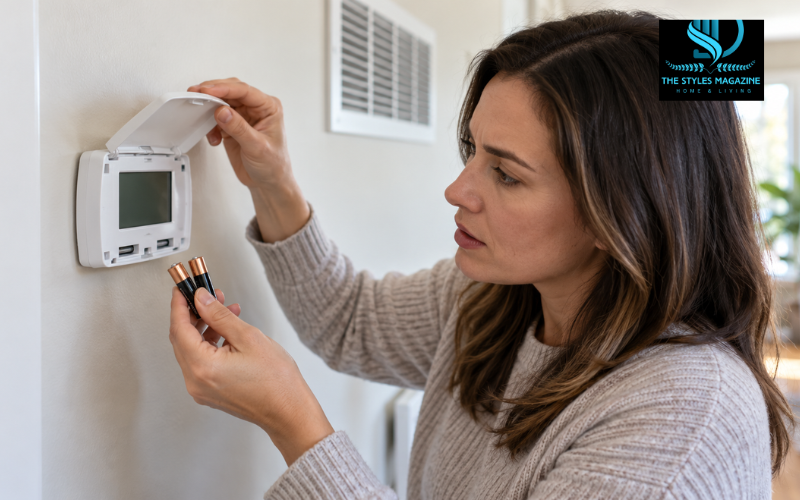
A blank display usually points to a power problem. If the thermostat uses replaceable batteries, install a fresh set of the correct type. Match the positive and negative symbols inside the compartment. Do not assume batteries are required simply because the faceplate can be removed; some hardwired models do not depend on them for normal power.
If fresh batteries do not restore the display, check the electrical panel. Look for a breaker marked Furnace, Heating, Air Handler, AC, or HVAC. A tripped breaker may sit between the On and Off positions. Move it fully to Off and then back to On once. Do not continue resetting it if it trips again because repeated tripping can indicate an electrical fault.
Check that the thermostat faceplate is sitting evenly and securely on its wall plate. Poor contact between the two sections can interrupt power on some models.
The furnace or air handler may also have an access-panel safety switch. If the panel is loose after maintenance or a filter change, the switch may cut power to the equipment and thermostat. Secure the panel without opening any electrical compartment.
During cooling season, inspect the area around the indoor AC equipment. A clogged condensate drain can fill the drain pan and activate a float switch, cutting power to prevent water damage. If you see standing water, switch the equipment off and arrange for the blockage to be cleared safely.
Honeywell Thermostat Not Working After a Battery Change
When a Honeywell thermostat is not working after a battery change, first confirm that the batteries are new, correctly sized, and fitted in the proper direction. Depending on the model, it may require AA or AAA alkaline batteries. Mixing old and new batteries can cause unreliable operation.
Check for a plastic shipping tab inside the battery compartment. If the thermostat is newly installed, the tab may still be preventing contact. Examine the metal terminals as well. Dirt or corrosion can stop the batteries from supplying power. Turn off the HVAC power before handling the thermostat. Light surface residue may be cleaned carefully according to the product instructions, but badly corroded or damaged contacts may require replacement.
Reinstall the battery tray fully or press the thermostat evenly onto the wall plate. Never force it. Bent connector pins or an incorrectly seated faceplate can cause further damage.
Some models lose the time, date, schedule, or other preferences after the batteries have been empty for a long period. Restore these settings and verify the system mode. If the screen remains blank with correctly fitted batteries, the thermostat may rely on HVAC power, have damaged contacts, or have an internal fault.
Honeywell Thermostat Not Turning On the Heat
Select Heat mode and set the target temperature several degrees above the current room temperature. Listen for a click and look for “Heat On” or a similar status message. A flashing message often means the thermostat is waiting through a protective delay rather than failing.
Check the furnace power switch, which may look like a normal light switch near the equipment. It should be in the On position. Also check the heating or HVAC breaker and make sure the furnace access panel is closed securely.
If the thermostat indicates that heat is on but the home remains cold, the problem may be beyond the thermostat. A furnace can fail because of an ignition problem, dirty filter, safety lockout, gas supply issue, failed component, or another equipment fault. A heat pump can also experience problems with its outdoor unit or backup heat.
Incorrect installer settings can prevent heating after a reset or thermostat replacement. The thermostat must be configured for the correct equipment, such as a conventional furnace or heat pump. Do not guess at these settings. Use the manual for the exact model or ask an HVAC professional to check the configuration.
Honeywell Thermostat Not Turning On the AC
Set the thermostat to Cool and choose a target temperature several degrees below the room temperature. If “Cool On” flashes, wait at least five minutes without changing the settings. This delay helps protect the compressor from rapid restarts.
Check the HVAC breakers. Some systems have separate breakers for the indoor air handler and outdoor condenser. An outdoor disconnect may also be present, but it should only be inspected or operated according to the equipment instructions. Never open an electrical enclosure.
Look near the indoor unit for water in the condensate pan. If a blocked drain activates the float switch, the air conditioner may stop and the thermostat may lose power. Treat water near electrical equipment cautiously.
A dirty filter can restrict airflow. In severe cases, poor airflow may contribute to an iced evaporator coil and weak or absent cooling. If you see ice, turn off cooling and arrange for the cause to be checked. Do not chip ice from the coil.
When the thermostat shows that cooling is active but the outdoor unit remains silent, the fault may involve the condenser, electrical supply, controls, or another HVAC component. These problems need professional testing.
When the Fan Works but Heating or Cooling Does Not
A working fan confirms that at least part of the control system is responding, but it does not prove that the furnace, heat pump, or air conditioner is operating correctly.
Set the fan to Auto and request heating or cooling. If the fan runs only when set to On, it may simply be circulating room-temperature air. Check that the thermostat is in Heat or Cool mode and that the target temperature creates a genuine demand.
Also review the schedule. A programmed temperature, temporary hold, geofencing rule, or energy-saving feature can override what you expect the system to do. On a smart model, check both the thermostat and its connected app.
If the thermostat displays a heating or cooling call but the air is not being conditioned, the issue is more likely to be within the HVAC equipment. Possible causes include ignition failure, a stopped outdoor unit, a safety lockout, or incorrect heat-pump operation. Diagnosis beyond basic checks should be left to a qualified technician.
Old or Manual Honeywell Thermostat Not Working
Older and manual Honeywell thermostats need a slightly different approach. Check that each system switch moves fully into position and that the temperature control is not stuck between settings. If the model uses batteries, replace them with the type listed in its manual.
Make sure the thermostat remains firmly attached and level if its instructions require level mounting. Dust around an older mechanical thermostat can affect moving parts, but avoid opening or cleaning its internal mechanism unless the manufacturer’s instructions specifically allow it.
Age alone does not prove that a thermostat has failed. The real fault may still be in the wiring, power supply, furnace, or cooling equipment. However, faded displays, inconsistent switching, broken controls, inaccurate temperature readings, and repeated loss of settings may support replacement.
Some older thermostats contain mercury. A mercury thermostat may have a small sealed glass bulb containing a silver liquid. Do not break, open, or place it in household waste. Contact your local authority or an approved recycling service for safe disposal instructions.
Understanding “Wait,” “Heat On,” “Cool On,” and Other Display Messages
Display messages often explain what the thermostat is doing. “Wait” or a flashing “Cool On” commonly indicates a temporary protection delay. Allow the delay to finish before deciding that the air conditioner is not responding.
A steady “Heat On” or “Cool On” generally indicates that the thermostat is requesting operation. If the correct equipment does not start, the problem may involve power, wiring, configuration, or the HVAC unit.
A low-battery symbol means the batteries should be replaced promptly. “Recovery” commonly means a programmed thermostat has started early so the room can reach the scheduled temperature at the chosen time. “Temporary Hold” indicates that a manual temperature change will last only until the next scheduled period. Names and behaviour vary by model.
Locked controls can prevent temperature or menu changes. Use the instructions for that thermostat rather than trying random codes. Sensor warnings, connection alerts, and numbered error codes are also model-specific. Look up the exact message in the correct manual or on Honeywell Home support.
Honeywell Thermostat Not Working After a Reset
Give the thermostat enough time to restart after a reset. Avoid removing power again while it is loading. When it becomes responsive, check the time, date, system mode, fan setting, schedule, and temperature.
A factory reset may remove installer settings as well as personal preferences. If the thermostat no longer knows whether it controls a furnace, heat pump, one-stage system, or multi-stage system, heating and cooling may not work correctly. Restore only the settings specified for your equipment.
Smart thermostats may also require Wi-Fi reconnection, account setup, or app pairing. A lost internet connection should not disable basic local control on many models, but connected features may be unavailable.
A factory reset should not be the first response to every fault. It cannot repair a tripped breaker, blocked drain, failed transformer, loose wire, or faulty furnace. Because reset procedures and their effects differ, follow the manual for the exact model.
Power, Wiring, and HVAC Problems Behind Thermostat Failure
Most thermostats use low-voltage control wiring, but the HVAC equipment is connected to higher-voltage electricity. A loose wire, interrupted C-wire, blown low-voltage fuse, failed transformer, or activated safety switch can make a working thermostat appear dead.
The C-wire provides continuous power to many digital and smart thermostats. If that power disappears, the display may go blank or the thermostat may restart repeatedly. Batteries do not always replace the function of a C-wire; their role depends on the model.
A blown control-board fuse can result from a short circuit, especially after wiring or installation work. Replacing a fuse without finding the cause may lead to another failure. Likewise, bypassing a furnace-door switch, condensate switch, or other safety device can create a serious hazard.
Homeowners can safely check settings, batteries, breakers, accessible panels, and visible water when conditions are safe. Turn off power before removing a thermostat faceplate. Do not touch bare conductors, move wires between terminals, or open HVAC electrical compartments unless you are trained and authorised to do so.
Repair or Honeywell Thermostat Replacement
A thermostat probably does not need replacement if the problem disappears after correcting the mode, schedule, batteries, breaker, or loose faceplate. Replacement becomes more reasonable when the screen has permanently failed, controls respond inconsistently, the temperature reading remains inaccurate after proper checks, or internal damage is visible.
Compatibility matters more than appearance. Before buying a Honeywell thermostat replacement, identify the system type, number of heating and cooling stages, voltage, available wires, and whether the home uses a heat pump. Check whether the chosen model needs a C-wire or another approved power method.
Do not install a standard low-voltage thermostat on a high-voltage system such as some electric baseboard heaters. If you cannot identify the voltage or equipment type, ask a professional.
Remember that a new thermostat will not repair a failed transformer, furnace control board, air conditioner, or damaged wiring. Confirming the source of the problem first can prevent unnecessary spending.
When to Stop Troubleshooting and Call an HVAC Professional
Stop troubleshooting immediately if you notice smoke, sparks, burning smells, melted plastic, unusually hot wiring, or water close to electrical parts. Turn off the system only if you can do so safely and contact an appropriate professional. Follow emergency guidance if there is an immediate fire or gas risk.
Professional help is also needed when a breaker trips repeatedly, a low-voltage fuse keeps blowing, the thermostat continues losing power, or an error returns after the approved basic checks. Internal wiring, transformers, refrigerant systems, gas appliances, combustion equipment, and control boards require suitable training and testing tools.
Arrange prompt help during very hot or cold weather, particularly when children, older adults, pets, or people with health conditions are in the home. While waiting, use only safe heating or cooling alternatives and follow local safety advice.
Conclusion
When a Honeywell thermostat is not working, begin with the symptom rather than assuming the unit needs replacement. A blank display usually calls for power checks, while a working screen with no heat or cooling points towards settings, a protective delay, configuration, or HVAC equipment trouble.
Check the mode, target temperature, schedule, batteries, breaker, faceplate, furnace door, and visible condensate condition. Give protective delays time to finish and read every display message carefully. Because Honeywell models differ, use the manual for your exact thermostat before performing a reset or changing configuration settings.
If these basic, low-risk checks do not solve the problem, an HVAC professional can test the thermostat, wiring, power supply, and equipment safely. Accurate diagnosis is the best way to restore reliable control without replacing parts unnecessarily.
Frequently Asked Questions
Why Is My Honeywell Thermostat Screen Completely Blank?
The thermostat may have dead batteries, interrupted C-wire power, a tripped breaker, a loose faceplate, an open furnace panel, or a triggered condensate safety switch.
Why Does My Honeywell Thermostat Say “cool On,” But The Ac Is Not Running?
A flashing “Cool On” message usually indicates a compressor protection delay. Wait about five minutes. If the message becomes steady but cooling does not begin, check the AC system.
Why Is My Honeywell Thermostat Not Working After Changing The Batteries?
The batteries may be installed incorrectly, be the wrong size, or have poor contact with the terminals. The battery tray or thermostat faceplate may also be loose.
Should I Reset My Honeywell Thermostat When It Stops Working?
A reset should not be your first step. Check the settings, batteries, power supply, and display messages first. Resetting may erase schedules, Wi-Fi details, and equipment configuration.
When Should I Replace My Honeywell Thermostat?
Consider replacement if its display, sensor, or controls repeatedly fail after power and equipment problems have been ruled out. Confirm HVAC voltage, wiring, and system compatibility before purchasing another thermostat.
Enjoyed it? Find more exclusive content on The Styles Magazine.
Disclaimer: This article provides general information about common Honeywell thermostat problems and basic troubleshooting. Features, wiring, display messages, and reset procedures differ between models and HVAC systems. Always consult the official manual for your exact thermostat before making changes. Turn off the appropriate power supply before removing the thermostat faceplate, and never touch exposed wiring or bypass a safety switch. Contact a qualified HVAC or electrical professional if you notice repeated breaker trips, smoke, sparks, burning smells, water near electrical equipment, or a problem involving internal wiring, gas, refrigerant, or combustion components.