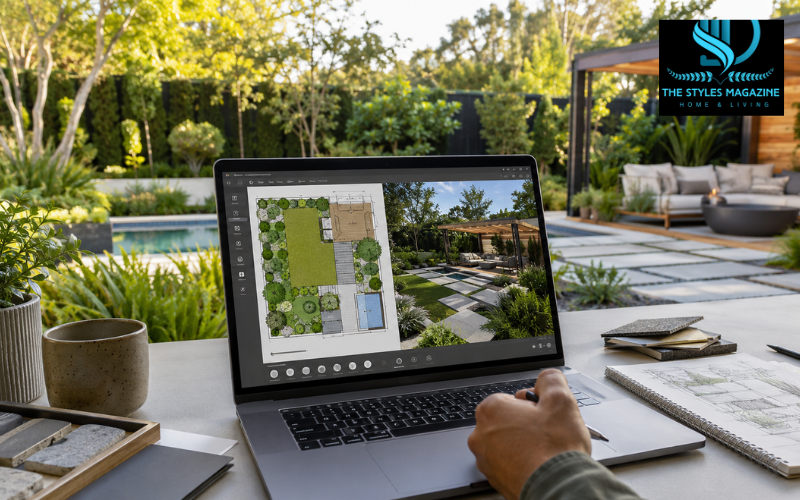
Landscape design software helps you plan an outdoor space before you spend money on plants, materials, furniture, or construction. Instead of guessing how a garden, patio, lawn, pathway, deck, or pool might look, you can create a visual plan on your computer, phone, or tablet. This makes it easier to test ideas, compare layouts, and avoid costly mistakes.
At its simplest, landscape design software lets you draw a basic outdoor layout. More advanced tools allow you to create 2D plans, view the design in 3D, add trees and plants from a library, place outdoor furniture, estimate costs, and even preview the project using a real photo of your property. Some tools are made for homeowners who want to redesign a backyard, while others are built for professional landscapers, architects, and contractors.
The best landscape design software is not the same for everyone. A beginner may need a simple drag-and-drop tool, while a professional may need accurate measurements, CAD features, drainage planning, and client-ready documents. Your ideal choice depends on your skill level, budget, device, and project size.
Quick Guide Table: Which Landscape Design Software Should You Choose?
| User Need | Best Type of Software | What to Look For |
| Beginner or DIY user | Landscape design software for beginners | Simple controls, drag-and-drop tools, templates, and easy 3D previews |
| Free planning | Free landscape design software | Basic layouts, limited plant libraries, and simple visualization features |
| Realistic outdoor preview | 3D landscape design software | 3D views, realistic materials, lighting, shadows, and plant placement |
| Mac user | Landscape design software for Mac | macOS support, browser access, export options, and smooth performance |
| Fast visual ideas | AI or mobile landscape apps | Photo upload, AI suggestions, AR previews, and quick design concepts |
| Professional work | CAD/BIM landscape software | Accurate measurements, grading, drainage, construction documents, and client presentations |
What Is Landscape Design Software?
Landscape design software is a digital tool used to plan, design, and visualize outdoor spaces. It helps users arrange natural elements, such as grass, flowers, shrubs, and trees, along with built features like patios, walkways, fences, decks, pergolas, pools, lighting, and seating areas.
Unlike a simple drawing app, landscape design software is made specifically for outdoor planning. A drawing tool may let you sketch shapes, but it usually does not include plant libraries, scale controls, 3D views, outdoor materials, irrigation overlays, or realistic property visualization. Landscape software gives more structure to the design process, so the final plan is easier to understand and use.
Homeowners use it to plan small gardens, front yards, and backyard upgrades. Beginners use it to test ideas before hiring help or buying materials. Designers use it to present better concepts to clients. Contractors use it to plan measurements, materials, and installation work. Whether the project is a simple patio or a full outdoor renovation, the software helps turn rough ideas into a more organized plan.
Key Features to Look for in Landscape Design Software
Good landscape design software should make planning easier, not more confusing. One of the most useful features is 2D layout planning. This helps you map the space from above, including property lines, garden beds, patios, paths, lawns, and structures. A clear 2D plan is helpful for measurements and layout decisions.
3D visualization is also important because it shows how the finished space may look from different angles. This is especially useful when planning decks, pools, raised beds, retaining walls, or outdoor seating areas. A 3D preview can help you notice problems that may not be obvious in a flat drawing.
Plant and material libraries are another major benefit. Many tools include trees, shrubs, flowers, grass types, pavers, stones, fences, furniture, and lighting objects. Some programs also help with sunlight, shade, slopes, irrigation, and outdoor lighting. Exporting, printing, sharing, and cost-estimation features are useful when you want to discuss the plan with family, clients, or contractors.
Best Landscape Design Software for Beginners
Landscape design software for beginners should be simple, clear, and easy to learn. Beginners usually do not need complex CAD tools or advanced construction documents. They need software that helps them place plants, test patio layouts, plan walkways, and see the design without spending weeks learning the program.
Tools like Planner 5D, iScape, SmartDraw, Canva, and Realtime Landscaping Pro are often useful for different types of beginner projects. Planner 5D is helpful for users who want both 2D and 3D views. iScape is useful for people who want to use a real photo of their yard and quickly see how plants or hardscape elements may look. SmartDraw is better for simple flat plans, while Canva can work for early brainstorming and mood-board style layouts.
For beginners, ease of use matters more than having every advanced feature. A tool with too many professional controls can slow down the planning process. The best choice is usually software that helps you create a clean, understandable plan without making the design feel stressful.
Best Free Landscape Design Software Options
Many people search for landscape design software free because they want to test ideas before paying. Free tools can be very useful for simple planning, especially if you are working on a small garden, patio, or backyard refresh. A free version may let you create basic layouts, add simple objects, and view your design in 2D or 3D.
However, free landscape design software often has limits. Some tools restrict the number of objects, materials, exports, or high-quality renderings. Others may include watermarks, limited plant libraries, or fewer customization options. This does not make them useless, but it means they are better for early planning than final professional work.
Free tools are a good starting point if you are exploring ideas, comparing layouts, or learning how landscape software works. If your project becomes more detailed, you may need to upgrade to a paid version for better visuals, more objects, accurate scaling, or client-ready exports. For many homeowners, starting with free landscape design software for beginners is a smart way to avoid paying before understanding what they really need.
3D Landscape Design Software Free and Paid Choices
3D design is one of the biggest reasons people use landscape design software. A flat plan can show where things go, but a 3D view helps you understand height, spacing, depth, and style. This is useful when planning outdoor kitchens, pergolas, decks, pools, garden walls, or layered planting areas.
When people search for 3D landscape design software free, they usually want a tool that can show the final space without a high cost. Free or low-cost 3D tools are good for simple layouts and basic visualization. They can help you decide whether a patio is too large, a pathway feels natural, or a seating area fits well in the yard.
Paid 3D software usually offers more realistic results. It may include better lighting, shadows, textures, plant details, and walkthrough views. Professional tools can also create polished images for clients or construction planning. If your goal is only to visualize your own backyard, a simple 3D tool may be enough. If you need accurate, high-quality presentations, a paid program is usually worth considering.
Landscape Design Software for Mac Users
Mac users should always check compatibility before choosing landscape design software. Some popular tools work only on Windows, while others support macOS, web browsers, or mobile devices. This matters because buying the wrong software can lead to installation problems or poor performance.
Browser-based tools are often a good option for Mac users because they work online without needing a traditional desktop installation. Planner 5D, SmartDraw, and Canva can be useful for people who want flexible access across devices. SketchUp and Vectorworks Landmark are stronger choices for users who need more serious 3D modeling or professional landscape design features on macOS.
Before subscribing or buying, Mac users should check the system requirements, browser support, file export options, and whether the tool offers the specific landscape features they need. Some software may run on Mac but still be better suited for interior design than outdoor planning. The best landscape design software for Mac should match both your device and your project goals.
Landscape Design Software AI Features
Landscape design software AI features are becoming more common. AI can help users create quick concepts, suggest layout ideas, generate style directions, or speed up early brainstorming. This can be useful for beginners who are not sure where to place plants, seating areas, walkways, or garden zones.
AI-assisted tools can help you move faster from a blank screen to a first idea. For example, you may be able to upload a photo, describe the style you want, or receive design suggestions based on your outdoor space. This can make planning feel less overwhelming.
However, AI is not a replacement for accurate measurements, local climate knowledge, plant care, drainage planning, or construction expertise. A design may look attractive but still be impractical if it ignores slope, soil, sunlight, water flow, or long-term plant growth. AI is best used as a creative helper. For real projects, especially expensive or structural ones, human review is still important.
Mobile and AR Landscape Design Apps
Mobile and AR landscape design apps are useful when you want to plan directly from the property. Instead of starting with a blank layout, some apps allow you to take a photo of your house, yard, or garden and place plants, trees, stones, or outdoor objects over the image. This makes the design easier to imagine.
Apps like iScape are popular because they focus on quick visual planning. They can be helpful for testing flower beds, front-yard curb appeal, small garden updates, or simple backyard changes. Mobile apps are also convenient because you can use them outside while standing in the actual space.
The main limit is accuracy. A photo overlay can show how something may look, but it may not provide the same level of measurement control as desktop software. Mobile apps are best for visual ideas and early planning. For detailed construction, drainage, grading, or large-scale outdoor projects, full desktop landscape design software is usually more reliable.
Professional Landscape Design Software for Contractors and Architects
Professional landscape design software is built for users who need more than simple visuals. Contractors, landscape architects, and design firms often need CAD, BIM, GIS, grading, drainage, irrigation, construction documents, plant schedules, and accurate material planning. These features help turn a design into something that can be priced, approved, and built.
Vectorworks Landmark is a strong example of professional landscape design software because it supports advanced landscape planning, 2D and 3D workflows, site modeling, documentation, and professional presentation needs. SketchUp Pro is widely used for custom 3D modeling and is especially useful for visualizing structures, terrain, and outdoor features. DynaScape is another professional option, often used for detailed landscape plans and plant-focused workflows.
Professionals need more accuracy than casual users because their designs affect budgets, labor, materials, safety, and client expectations. A homeowner may only need a realistic preview, but a contractor may need measurements, quantities, and installation-ready drawings. This is why professional software is usually more expensive and takes longer to learn.
Landscape Design Software Reddit and User Reviews
Many people search for landscape design software Reddit before choosing a tool because they want honest opinions from real users. Reddit discussions, forums, and review sites can reveal practical details that product pages may not highlight. Users often talk about pricing, learning curve, software limits, customer support, and whether a tool feels easy or frustrating.
Common complaints include subscription costs, limited free features, slow performance on large designs, device compatibility problems, and tools that look simple at first but become restrictive later. These points are important because the best software on paper may not be the best choice for your workflow.
At the same time, user reviews often praise software that makes visualization easy, provides realistic 3D views, includes strong plant libraries, or helps clients understand a design quickly. Reviews are helpful, but they should not be the only deciding factor. One person’s bad experience may come from using the wrong tool for the wrong project. It is better to compare several opinions, check official features, and try a demo or free version when possible.
How to Choose the Best Landscape Design Software for Your Project
Choosing the best landscape design software starts with understanding your project. If you are planning a small flower bed or patio, you do not need a complex professional program. A simple beginner-friendly or free tool may be enough. If you are redesigning an entire backyard with grading, drainage, lighting, and hardscape work, you may need more advanced software.
You should also think about your skill level. Beginners usually benefit from drag-and-drop tools, templates, and simple 3D previews. DIY homeowners may want cost estimates, plant libraries, and easy sharing options. Professionals may need CAD tools, file imports, construction documents, and accurate measurements.
Platform matters too. Some tools are Windows-only, some work on Mac, and others run in a browser or mobile app. Pricing is another key point. A free plan may be enough for early ideas, while paid software may be better for serious projects. Whenever possible, start with a trial or free version before paying. This helps you understand whether the software feels comfortable and includes the features you actually need.
Common Mistakes to Avoid When Using Landscape Design Software
One common mistake is choosing software that is too advanced. A beginner may feel excited by professional features, but if the tool is hard to learn, the project may never get finished. Another mistake is choosing software that is too basic for a complex project. A simple photo app may look nice, but it may not help with scale, drainage, or material planning.
Accurate measurements are also important. A design may look beautiful on screen, but if the property boundaries, patio size, path width, or plant spacing are wrong, the real project can become expensive and frustrating. Before finalizing a plan, users should measure carefully and consider how the space will be used.
It is also easy to forget real outdoor conditions. Sunlight, shade, climate, soil, slope, drainage, and plant growth all affect the final result. A plant that looks perfect in software may not survive in the wrong location. The best results come from combining digital planning with practical outdoor knowledge. Landscape design software is a planning tool, not a replacement for common sense or expert advice when needed.
Conclusion: Choosing the Right Landscape Design Software
The right landscape design software depends on your goals, experience, device, budget, and project size. A homeowner planning a small garden may be happy with a free or beginner-friendly tool. A DIY user designing a full backyard may need 3D previews, plant libraries, and cost estimates. A professional contractor or landscape architect may need CAD, BIM, site modeling, and construction documents.
The best approach is to start simple. Use software that helps you clearly understand your space, test ideas, and make better decisions before buying materials or starting work. If the project becomes more technical, larger, or client-based, then professional-grade software may be the better choice.
Landscape design software is most valuable when it helps you move from imagination to a realistic plan. Whether you are designing a peaceful garden, a useful patio, a family-friendly lawn, or a complete outdoor living area, the right tool can save time, reduce mistakes, and help you create a space that feels planned, practical, and enjoyable.
FAQs
What Is Landscape Design Software Used For?
Landscape design software is used to plan outdoor spaces such as gardens, lawns, patios, pathways, decks, pools, and backyards before starting real work.
Is There Free Landscape Design Software For Beginners?
Yes, many tools offer free plans or trials. Free versions are useful for basic layouts, simple 3D previews, and early planning, but they may have limited features.
What Is The Best Landscape Design Software For Beginners?
The best option for beginners is software with simple controls, drag-and-drop design, ready-made objects, and easy 2D or 3D viewing without a steep learning curve.
Can I Use Landscape Design Software On Mac?
Yes, some landscape design software works on Mac, while browser-based tools can also run on macOS. Always check compatibility before purchasing or subscribing.
Is Ai Landscape Design Software Reliable?
AI landscape design software is helpful for quick ideas and style suggestions, but real projects still need accurate measurements, sunlight checks, drainage planning, and human review.
Enjoyed it? Find more exclusive content on The Styles Magazine.
Disclaimer: This article is for general informational purposes only. Software features, pricing, and availability may change over time. Always check the official software website and consult a landscape professional for complex construction, drainage, or structural projects.