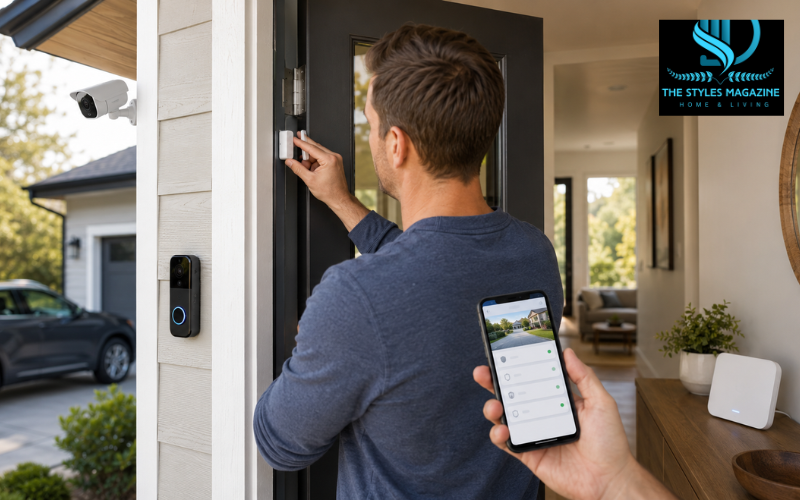
DIY home security systems let you install and manage home protection equipment without paying a technician to set up the entire system. Most modern kits use wireless door sensors, motion detectors, cameras, sirens, a central hub, and a mobile app. You can usually start small and add more devices later.
For homeowners and renters, the main attraction is flexibility. You decide which doors, windows, rooms, and outdoor areas need coverage. Depending on the brand, you may also choose between self-monitoring, 24/7 professional monitoring, cloud video storage, or a setup that keeps recordings locally without a monthly cloud fee.
There is no single system that fits every home. A small apartment may only need a few entry sensors and a camera, while a detached house may benefit from outdoor cameras, environmental sensors, cellular backup, and professional monitoring.
This guide compares leading DIY home security systems in 2026, including SimpliSafe, Abode, Ring, Cove, and Eufy, while looking at costs, cameras, subscriptions, installation, smart-home support, and reliability.
Quick Guide: DIY Home Security Systems
| Feature | What to Consider |
| Installation | Wireless, easy-to-install equipment is usually best for DIY setups |
| Monitoring | Choose between self-monitoring and 24/7 professional monitoring |
| Cameras | Consider indoor, outdoor, and video doorbell coverage |
| Monthly Fees | Check which features work without a subscription |
| Video Storage | Compare local storage with paid cloud storage |
| Backup Protection | Look for battery and cellular backup where available |
| Smart Home Support | Check Alexa, Google Home, HomeKit, Z-Wave, or Zigbee compatibility |
| Expansion | Choose a system that allows additional sensors and cameras later |
Simple Steps for Choosing a DIY Home Security System
- Check your entry points – Count the doors, accessible windows, garage areas, and other locations that need protection.
- Choose essential equipment – Start with a hub, entry sensors, motion detectors, and cameras where they provide useful coverage.
- Decide how to monitor it – Choose self-monitoring if you can respond to alerts yourself or professional monitoring for 24/7 support.
- Check recurring costs – Review monitoring, cloud recording, cellular backup, and premium app features before buying.
- Confirm backup and compatibility – Look for battery backup, cellular options, reliable Wi-Fi coverage, and support for your existing smart-home devices.
- Test everything after installation – Check sensors, cameras, sirens, notifications, and backup functions before relying on the system.
How DIY Home Security Systems Work
Most systems are built around a base station or hub. Think of it as the main connection point between your sensors, alarm, internet connection, mobile app, and monitoring service.
When a door sensor separates, a motion detector sees movement, or another device detects a possible problem, it sends a signal to the system. Depending on your settings, the system may sound a siren, send an alert to your phone, record camera footage, or send the alarm event to a professional monitoring center.
Many systems use their own low-power wireless connection for sensors while relying on Wi-Fi for cameras and app features. Better-equipped systems may also include battery and cellular backup so basic alarm functions can continue during a power or internet failure. Ring Alarm Pro, for example, can provide cellular backup internet under an eligible subscription, while Cove advertises cellular connectivity and battery backup with its monitoring service.
DIY installation only means you install the equipment yourself. You can still pay professionals to monitor the completed system 24/7. Abode, for example, supports both free self-monitoring and optional professional monitoring.
Best DIY Home Security Systems in 2026 at a Glance
The five systems below serve somewhat different buyers. Features and subscription prices were checked against current official information available in August 2026, but security companies can change plans and pricing at any time.
| System | Best Fit | Monitoring | Smart-Home Support | Storage / Backup |
| SimpliSafe | Easy setup and flexible monitoring | Self-monitoring and several professional tiers | Alexa and Google integrations | Battery/cellular features; cloud camera recording on eligible plans |
| Abode | Smart-home automation | Free self-monitoring and optional professional monitoring | HomeKit, Alexa, Google Home, Z-Wave, Zigbee | Cellular backup on supported plans/hubs |
| Ring Alarm / Pro | Existing Ring and Alexa households | Self-monitoring or professional monitoring with compatible plan | Strong Alexa/Ring ecosystem; Z-Wave devices supported | Cloud video; Alarm Pro can offer backup internet |
| Cove | Simple professionally monitored DIY alarm | Primarily professional monitoring | More limited smart-home focus | Cellular connection, battery backup and cloud camera options |
| Eufy ExpertSecure | Local storage plus advanced monitored protection | Professional monitoring-focused | Eufy ecosystem plus supported integrations | Expandable local storage, battery and dual 4G backup |
SimpliSafe currently has several paid monitoring levels, including Core, Pro, and Pro Plus, with Active Guard Outdoor Protection available on higher plans. Abode officially supports HomeKit, Alexa, Google Home, Zigbee, and Z-Wave. Eufy says ExpertSecure combines professional monitoring with expandable local storage and backup connectivity.
SimpliSafe, Abode, Ring, Cove, and Eufy: Key Strengths and Trade-Offs
SimpliSafe is well suited to people who want a straightforward modular alarm system. Sensors and cameras can be added as needed, and professional monitoring is optional. Its higher-level Pro and Pro Plus plans include Active Guard Outdoor Protection, with different monitoring windows depending on the selected plan. That service requires compatible SimpliSafe outdoor camera equipment.
Abode stands out when home automation matters. Compatible hubs can work with Apple HomeKit, Z-Wave and Zigbee devices as well as Alexa and Google Home. Free self-monitoring is also available, although some advanced automation functions are tied to paid plans.
A Ring DIY home security system makes the most sense for homes already using Ring doorbells, cameras, or Alexa devices. Ring renamed its subscription plans in January 2026: former Home Basic and Home Standard plans became Ring Solo and Ring Multi, while professional monitoring is now associated with eligible plans such as Ring Pro.
Cove focuses more strongly on professionally monitored protection. As of May 2026, its published monitoring tiers were Basic at $22.99, Plus at $32.99, and Premium at $42.99 per month.
Eufy ExpertSecure emphasizes local AI processing, expandable local storage, video verification, professional monitoring, battery backup, and cellular failover. Buyers mainly interested in avoiding monitoring subscriptions should also compare Eufy’s LocalSecure products rather than assuming ExpertSecure is the subscription-free choice.
Building a Complete DIY Home Security Kit
A good system should match the actual layout of your property instead of simply including as many devices as possible.
Most homes can build around a few important components:
- A central hub or base station
- Contact sensors for important doors and accessible windows
- Motion sensors for useful indoor areas
- Indoor or outdoor cameras where visual confirmation helps
- A video doorbell for the main entrance
- A siren
- Glass-break detection where large accessible windows create a concern
- Smoke, carbon monoxide, water, freeze, or other environmental sensors where the system supports them
- Optional keypads, panic buttons, smart locks, or key fobs
Abode, Cove, SimpliSafe, and Eufy all offer modular equipment that can cover combinations of intrusion, camera, and environmental security.
Before ordering equipment, count the doors and accessible windows you actually want monitored. This helps avoid an oversized starter package while leaving room to add devices later.
DIY Home Security Systems With Cameras
Cameras add something basic entry sensors cannot provide: visual context. If a motion alert occurs while you are away, a camera may help you determine whether someone is approaching the house, a package has arrived, or an alert needs immediate attention.
Indoor cameras are useful for selected interior spaces, while outdoor cameras can watch driveways, entrances, garages, and gates. Video doorbells are designed mainly for the front entrance. Useful features can include live viewing, motion alerts, night vision, person detection, two-way communication, and recorded event history.
The important issue with DIY home security systems with cameras without subscription is understanding what remains available when you stop paying. Some cameras allow live viewing without a plan but place recorded video history, advanced recognition, or other features behind a subscription.
Local-storage systems handle this differently. Eufy, for example, promotes local storage as an alternative to paying for cloud recording on compatible systems. Always check the exact camera model rather than assuming one brand-wide rule applies to every device.
Best DIY Home Security Camera Systems Without Subscription
“Without subscription” does not always mean every feature is permanently free. It may simply mean the camera continues working without a monthly plan.
For a true low-recurring-cost setup, look at where recordings are stored. Some systems save footage to a hub, hard drive, memory card, or other local storage instead of relying entirely on a cloud account.
Eufy’s LocalSecure approach is particularly relevant here. The company says its LocalSecure system uses local storage and can operate without a required monthly cloud-storage subscription. ExpertSecure also provides expandable local storage, but it is aimed more heavily at users who want professional monitoring and enhanced verification.
Abode is another useful option for people primarily interested in a best DIY home security camera system without subscription, because its security kits support free self-monitoring and app alerts. However, buyers should separately verify the storage and paid-feature requirements of the specific Abode camera they intend to use.
Check four things before buying: live viewing, recorded history, smart detection, and remote alerts. A camera is only truly subscription-friendly if the free features match what you actually need.
DIY Home Security Systems for Outdoor Protection
Outdoor security normally starts with the areas people naturally use to approach the property: the front entrance, back door, driveway, garage, side gate, and accessible ground-floor doors or windows.
Outdoor cameras can use wired power, rechargeable batteries, or compatible solar charging. Each option has a trade-off. Wired power reduces charging work, while battery cameras are usually easier to place. Solar charging can help in suitable locations but still depends on the product and available sunlight.
For DIY home security systems outdoor coverage, look beyond image resolution. Weather resistance, useful night visibility, motion zones, Wi-Fi strength, camera angle, and reliable alerts may matter more in daily use.
Placement also matters. A camera installed too high may show the top of someone’s head instead of a useful view. SimpliSafe, for example, recommends specific positioning for its Outdoor Camera Series 2 to improve motion capture and Active Guard performance.
Outdoor cameras work best alongside entry sensors rather than as a replacement for them.
Self-Monitoring vs Professional Monitoring
Self-monitoring means alerts come to you, usually through an app. You review the event and decide what to do. Professional monitoring sends qualifying alarm signals to a monitoring center, where trained staff can follow the provider’s response process and may request emergency assistance when necessary.
Self-monitoring can make sense if you regularly have access to your phone, want to avoid recurring monitoring charges, and are comfortable handling alerts yourself. Abode is one example of a system offering a no-monthly-fee self-monitoring option.
Professional monitoring can be more useful when you travel frequently, cannot always check your phone, or want another layer of response. Ring says its professional monitoring requires an eligible Ring subscription, while SimpliSafe offers several professional monitoring levels.
When comparing the best self-monitored home security systems with no monthly fees, do not look only at whether the alarm sounds. Check whether remote app control, alerts, camera access, automation, and recording still work without a subscription.
Cheap DIY Home Security Systems and the Real Cost of Ownership
The starter-kit price is only part of what a security system costs.
A basic package may look inexpensive until you add sensors for extra doors, multiple cameras, a doorbell, video storage, cellular backup, professional monitoring, replacement batteries, or smart-home accessories. This is why the cheapest advertised kit may not remain the cheapest system after several years.
Cove illustrates the recurring-cost side clearly because its current service is built around paid professional monitoring, with published plans ranging from $22.99 to $42.99 per month as of May 2026. SimpliSafe also offers multiple paid monitoring levels, while Abode offers a free self-monitoring route.
For cheap DIY home security systems, compare the total cost of the setup you actually need. Add the hardware, required subscriptions, storage, and monitoring over several years. Local storage and self-monitoring can reduce recurring expenses, but only if you are comfortable giving up services included with paid monitoring.
Smart Home Compatibility and App Features
Smart-home compatibility becomes important when your security system needs to work with existing locks, lights, speakers, thermostats, or automation routines.
Abode provides one of the broader integration sets among mainstream DIY alarm systems. Its compatible hubs support Apple HomeKit, Alexa, Google Home, Z-Wave, and Zigbee. However, some third-party automation capabilities depend on the particular hub and Abode plan.
Ring is a more natural fit for Alexa-focused homes and people already using Ring cameras or doorbells. SimpliSafe supports a simpler smart-home approach rather than acting as a wide multi-protocol automation hub.
The mobile app is just as important as voice-assistant support. Check whether you can remotely arm or disarm the system, view cameras, create useful alerts, manage household users, and control automation without upgrading to a more expensive subscription.
Buy around the devices you already own rather than paying for integrations you will never use.
Power Outages, Internet Failures, Storage, and Privacy
A security system should not become useless the moment your internet connection fails. The first feature to check is battery backup for the hub. The second is cellular backup.
These are not always the same thing. Cellular alarm backup can keep alarm signals connected to a monitoring service, while full backup internet can keep a wider group of network devices online.
Ring Alarm Pro is unusual because it combines the alarm base station with eero Wi-Fi 6 functionality and can provide 24/7 Backup Internet with a compatible Ring subscription. Ring currently includes 3 GB of cellular backup data per month with eligible service.
Eufy’s ExpertSecure system takes another approach, advertising a 96Wh backup battery, dual 4G LTE backup, and expandable local storage.
Also consider privacy. Use a strong, unique account password and enable multi-factor authentication when available. Place indoor cameras only where they serve a clear security purpose, especially in homes shared with other people.
Finally, remember that a Wi-Fi camera may lose remote access or cloud features when internet service fails even if the alarm hub itself remains operational.
Installation, Testing, and What DIY Home Security Systems Reddit Discussions Can Tell You
Good equipment can still perform poorly when installed in the wrong place. Plan your layout before sticking sensors to walls or drilling camera mounts.
Door and window sensors need proper alignment. Motion detectors should be tested from realistic walking paths. Outdoor cameras should be checked during both daylight and darkness, and their Wi-Fi connection should be tested at the final mounting location. After installation, trigger each important sensor deliberately and confirm that the siren, app alert, and monitoring response work as expected.
Battery and cellular backup also deserve testing where the manufacturer provides a safe procedure. Re-test the system after adding new hardware.
Searching DIY home security systems Reddit discussions can add useful real-owner context. Recent r/homesecurity discussions show users comparing issues such as subscription costs, local storage, self-monitoring, integrations, camera reliability, and whether professional monitoring is necessary for their situation.
However, Reddit comments are individual experiences, not controlled product testing. A complaint may involve old hardware, an outdated app version, unusual Wi-Fi conditions, or a discontinued plan. Use recurring discussions to identify questions worth investigating, then confirm important details through the manufacturer’s current documentation.
Conclusion
The best DIY home security systems are not necessarily the systems with the most cameras, sensors, or premium features. The better choice is the one that matches your home and the way you actually want to manage security.
Start with the number of doors and accessible windows you need to protect. Then decide whether cameras are necessary, whether you are comfortable self-monitoring, how much you are willing to pay each month, and whether local video storage matters. Smart-home compatibility can be important if you already use connected locks, lights, or voice assistants, while battery and cellular backup deserve extra attention in areas with unreliable power or internet.
SimpliSafe, Abode, Ring, Cove, and Eufy each take a different approach. Current official information confirms meaningful differences in monitoring, subscriptions, storage, integration, and backup protection across these systems.
Choose based on the protection you genuinely need, then check current equipment compatibility and subscription terms before ordering. That usually leads to a more useful and affordable system than simply buying the largest security package available.
FAQs
Are DIY Home Security Systems Reliable?
Yes, a properly installed DIY security system can provide reliable home protection. Reliability depends on equipment quality, correct sensor placement, strong connectivity, regular testing, battery backup, and how quickly alerts are handled.
Can I use a DIY Home Security System Without Paying Monthly Fees?
Yes. Some systems allow free self-monitoring and local video storage. However, professional monitoring, longer video history, cellular backup, advanced detection, or certain app features may require a subscription.
What Equipment Does A Basic DIY security system need?
A basic setup usually includes a central hub, door and window sensors, a motion detector, and a siren. Cameras, video doorbells, environmental sensors, and smart locks can be added when needed.
Is Professional Monitoring Necessary For A DIY home security system?
No. Professional monitoring is optional with many systems. Self-monitoring can work well for people who regularly check their phones, while professional monitoring provides additional support when you cannot respond to an alert.
Are DIY Home Security Systems Suitable For Renters?
Yes. Wireless DIY systems can be particularly useful for renters because many sensors require little or no permanent modification. Always check mounting methods and your rental agreement before drilling holes or installing permanent equipment.
njoyed it? Find more exclusive content on The Styles Magazine.
Disclaimer: This article is for general informational purposes only and should not be treated as professional security advice. Product features, monitoring plans, prices, subscriptions, compatibility, and emergency-response services can change. Always verify current information directly with the security provider before purchasing or installing a system.